FOR INSTRUCTORS

Build and run your course from one Faculty Dashboard.

Adapt ready-made cases, schedule the term, review student work, and assign targeted practice where the evidence shows a gap.

01 ADAPT ready-made cases02 ASSEMBLE units and blocks03 SCHEDULE the term board04 READ performance05 REVIEW the evidence06 TAILOR targeted practice
UNIT CONTENT

Four types of clinical work.

Mix encounters, medication refills, results reviews, and staff messages in any unit.

Encounter

Students review the chart, interview and examine the patient, order a workup, and document a plan in an Office Visit or EMR Message.

  • History
  • Exam
  • Orders
  • SOAP note

Medication refill

Students weigh the indication, interactions, and monitoring for a refill request, decide whether to refill, and explain the decision to the patient.

  • Medication safety
  • Monitoring
  • Patient message

Results review

Students interpret a returned result in context and decide what happens next, from routine follow-up to urgent action.

  • Interpretation
  • Escalation
  • Critical results

Staff message

Students answer a question from a nurse, pharmacist, or colleague with a concise, professional reply.

  • Care team communication
  • Clinical judgment
ASSESSMENT

How student work is assessed.

Each medical submission is scored from 0 to 3 on three skills, with a reason for every score, and SOAP notes get section scores. Nursing shifts use four nursing skills. Instructors can correct an assessment from the student’s record.

01ACCURACY

Clinical Knowledge

Accurate, case-specific knowledge applied to diagnosis and management.

02REASONING

Reasoning & Clarity

Clear reasoning from the evidence gathered to each decision, including every order’s indication.

03EMPATHY

Communication & Empathy

Plain-language, empathetic communication with patients and the care team.

INSTRUCTOR WORKFLOW

Build and manage the curriculum in six steps.

Complete each step in the Faculty Dashboard.

01ADAPT

Adapt a ready-made case.

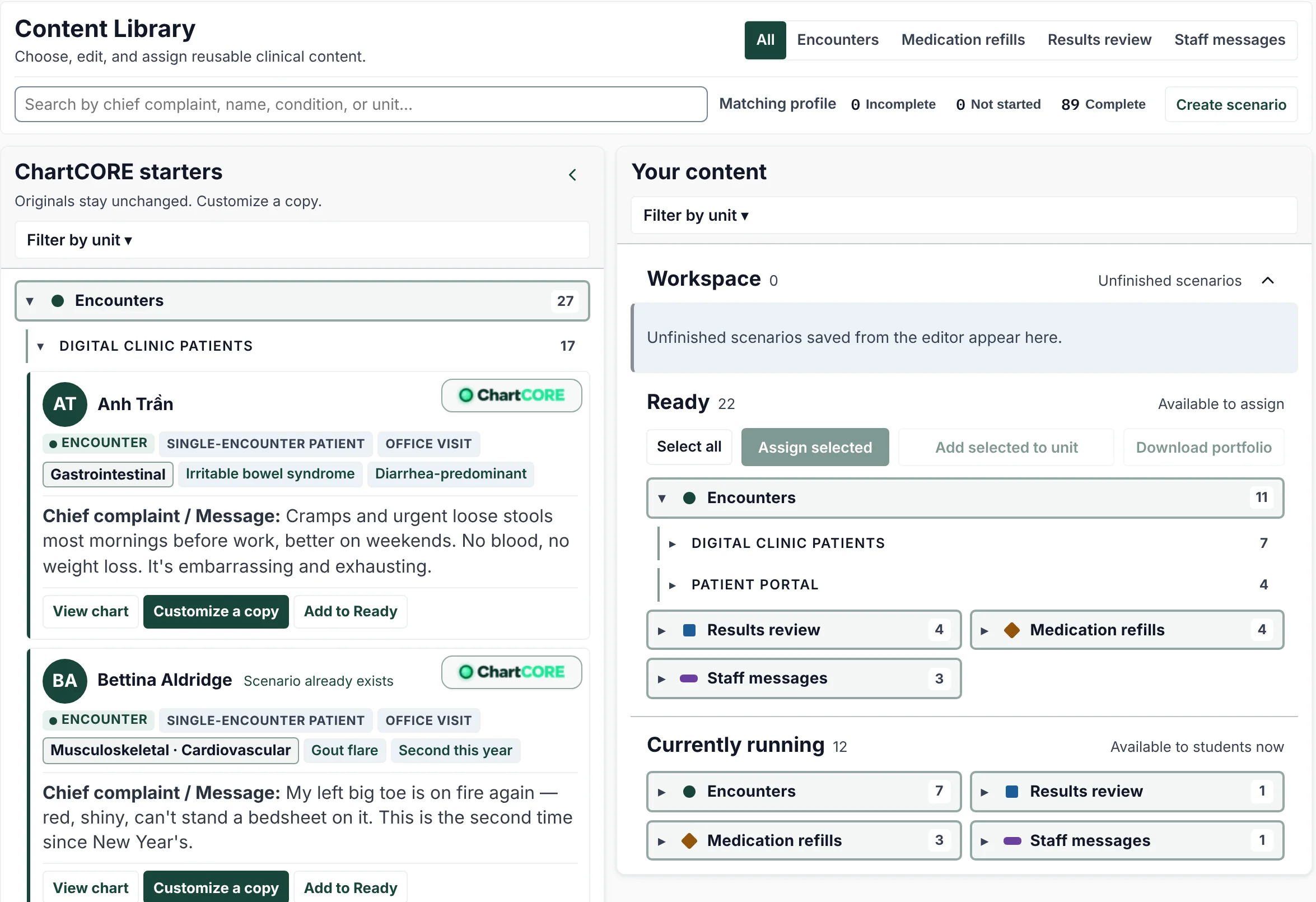
Start from ChartCORE’s ready-made cases. Customize a copy, from the chart and exam findings to the patient’s personality. The original stays unchanged.

  • Edit the presentation, history, vitals, medications, and prior visits.
  • Set lab results, orderable tests, and physical exam findings.
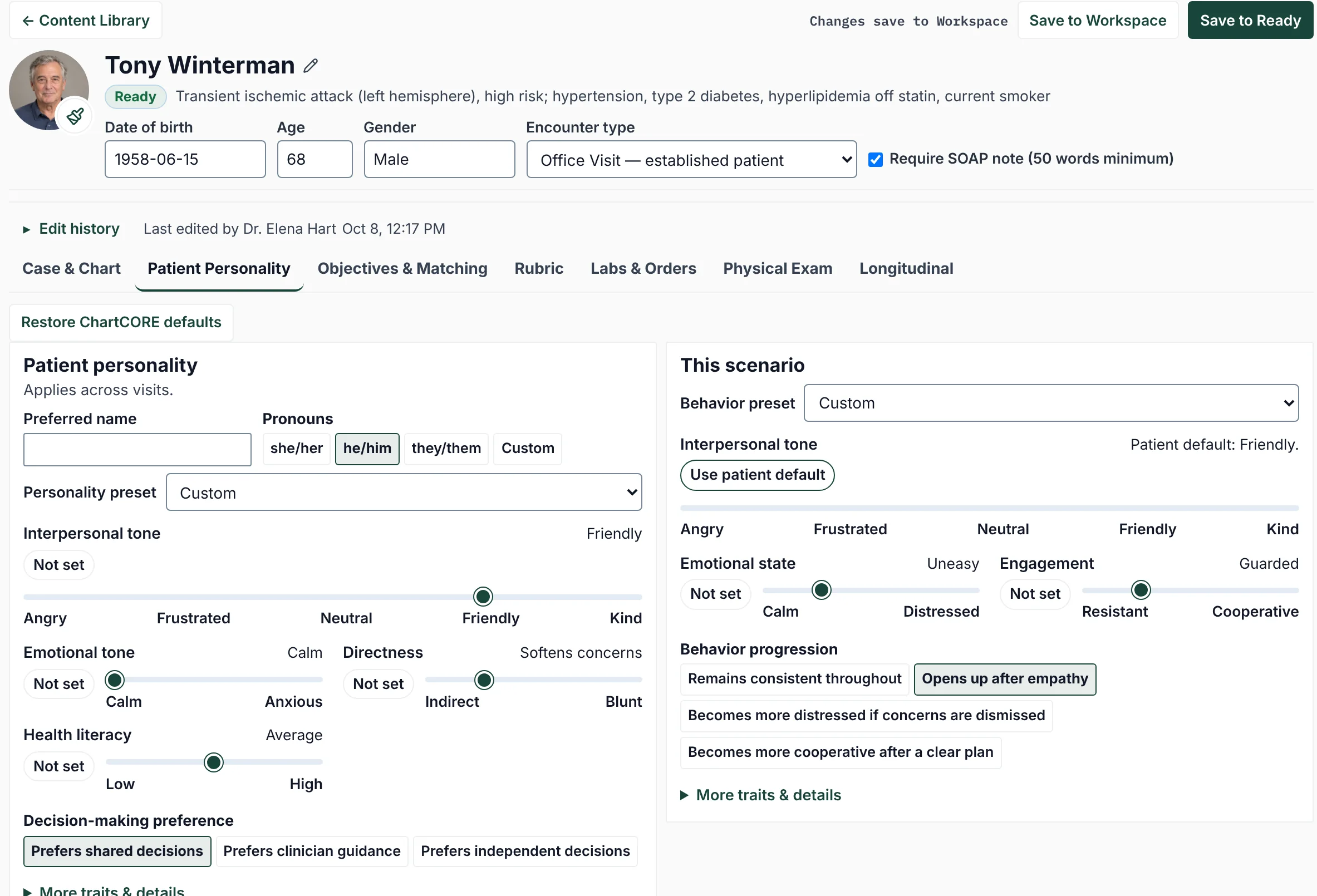
  • Shape the patient’s personality and how it shows in this scenario.
The ChartCORE Content Library: ChartCORE starter cases, each with its chief complaint and a Customize a copy button, beside the instructor’s own content grouped as Workspace, Ready, and Currently running.
Customize a copy of a starter case, then move it to Ready to assign.
The patient personality editor for a synthetic patient, Tony Winterman: sliders for interpersonal tone, emotional tone, directness, and health literacy, with this scenario’s emotional state, engagement, and behavior progression.
Set a stable personality, then adjust how the patient behaves in this scenario.
02ASSEMBLE

Group work into units and blocks.

A unit holds a week or topic of work and its learning objectives. Blocks keep related units together so you can schedule them as one.

  • Mix encounters, refills, results reviews, and staff messages.
  • Link each activity to the unit’s learning objectives.
  • See item counts, objective coverage, and release status at a glance.
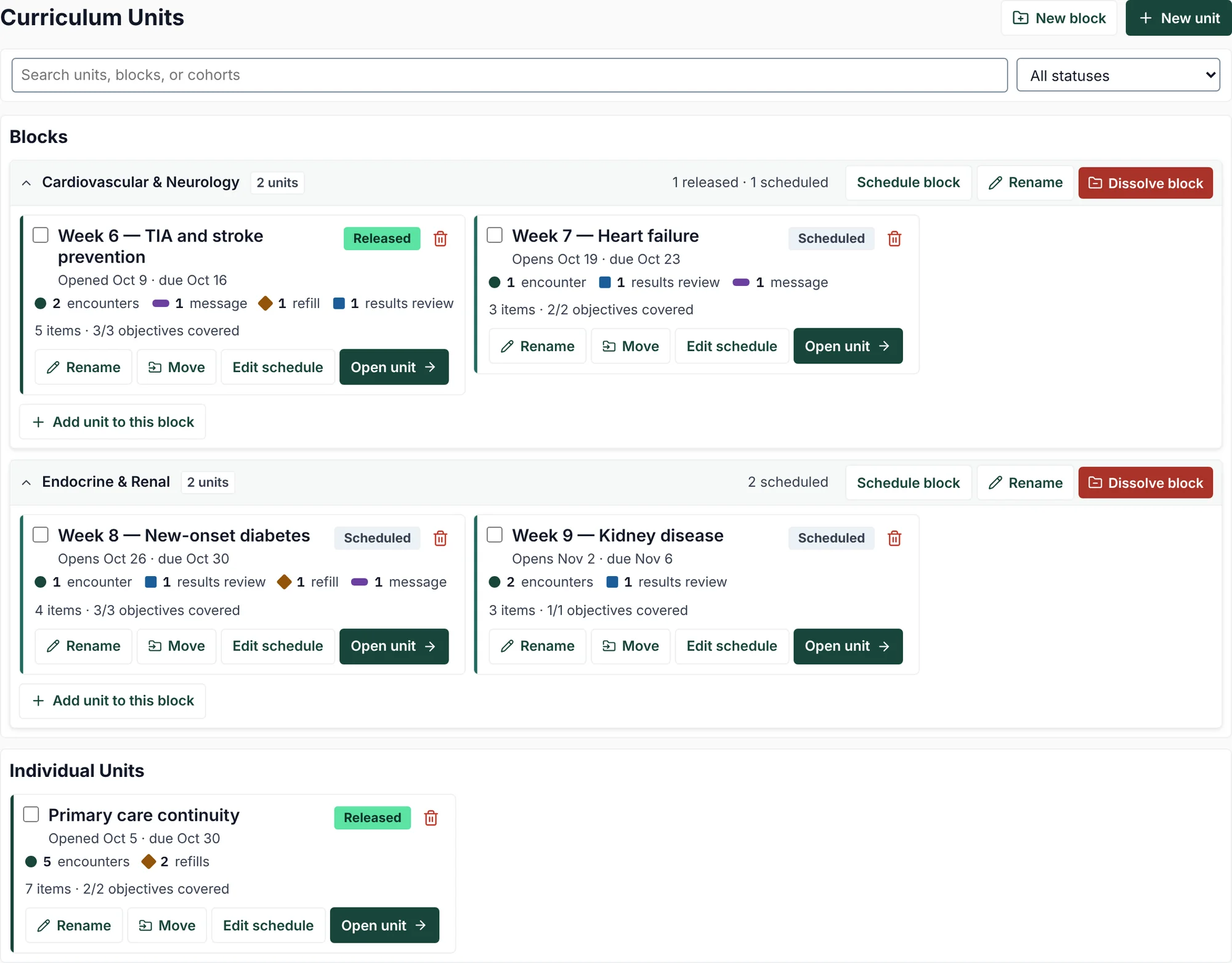
The Curriculum Units screen: a Cardiovascular & Neurology block and an Endocrine & Renal block, each holding weekly units with their dates, work by type, objective coverage, and release status.
Each unit shows its dates, its work by type, and how many objectives it covers.
03SCHEDULE

Schedule the term.

See every unit on one calendar. Release work now or on a date, or chain a unit to open a set number of days after another.

  • Set a due date and an Available until cutoff in your school’s time zone.
  • Switch between a calendar and a timeline of one to three months.
  • Recall released work, with or without its scores.
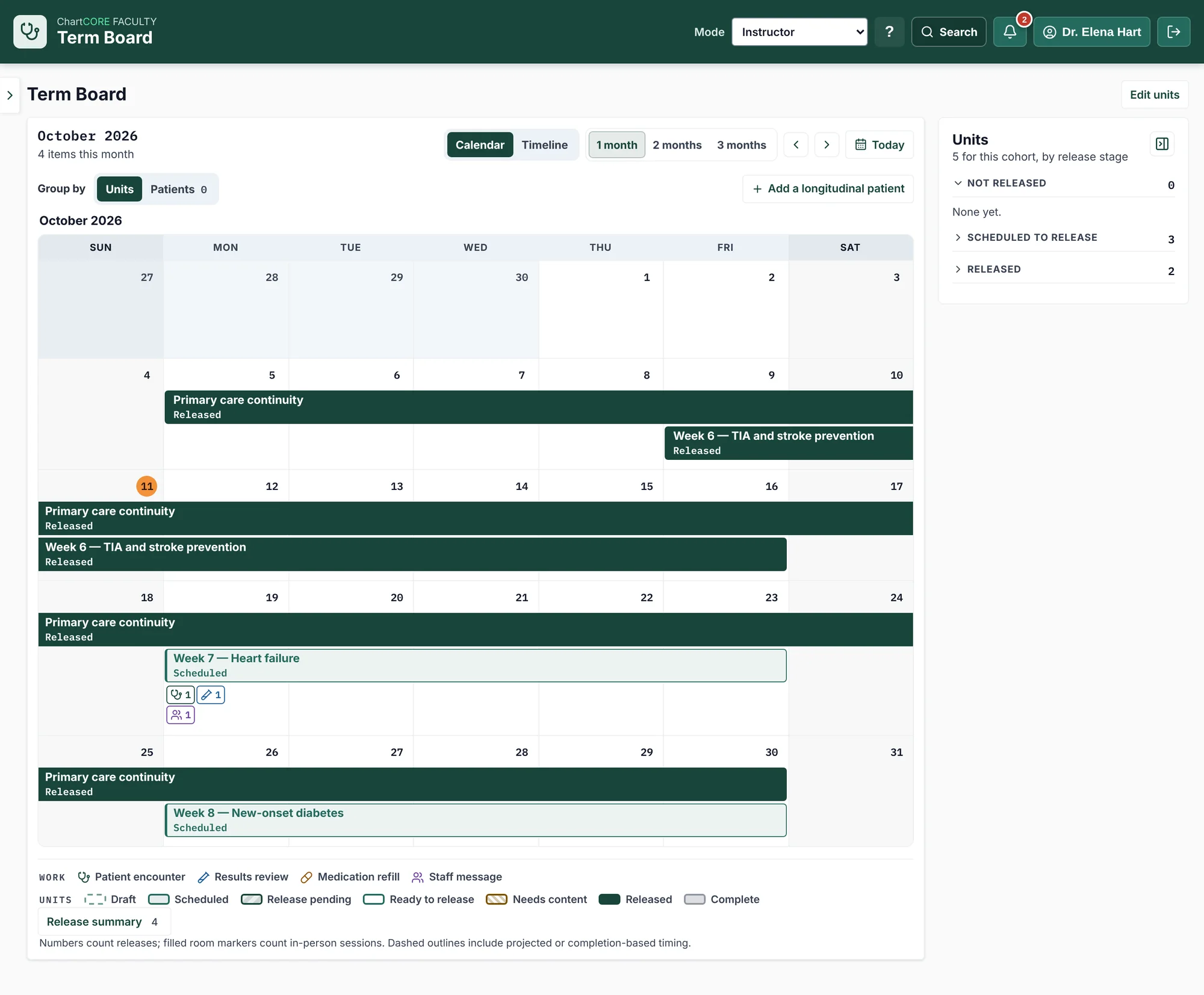
The Term Board calendar for October 2026: a month-long continuity unit and weekly units as bars, released units solid and scheduled units outlined, with release markers and a side list of units by release stage.
Released units appear solid; scheduled and chained units appear outlined.
04READ

See where support is needed.

Analytics show observed scores, trends, and distinct-case counts for each skill and clinical unit, for the whole cohort or one student.

  • Compare Clinical Knowledge, Reasoning & Clarity, and Communication & Empathy.
  • Filter by reporting window and clinical unit.
  • Export a CSV or print the report.
COHORT VIEW

Start with the whole cohort

Find the skill and clinical unit with the lowest scores, then open them to see which students need support.
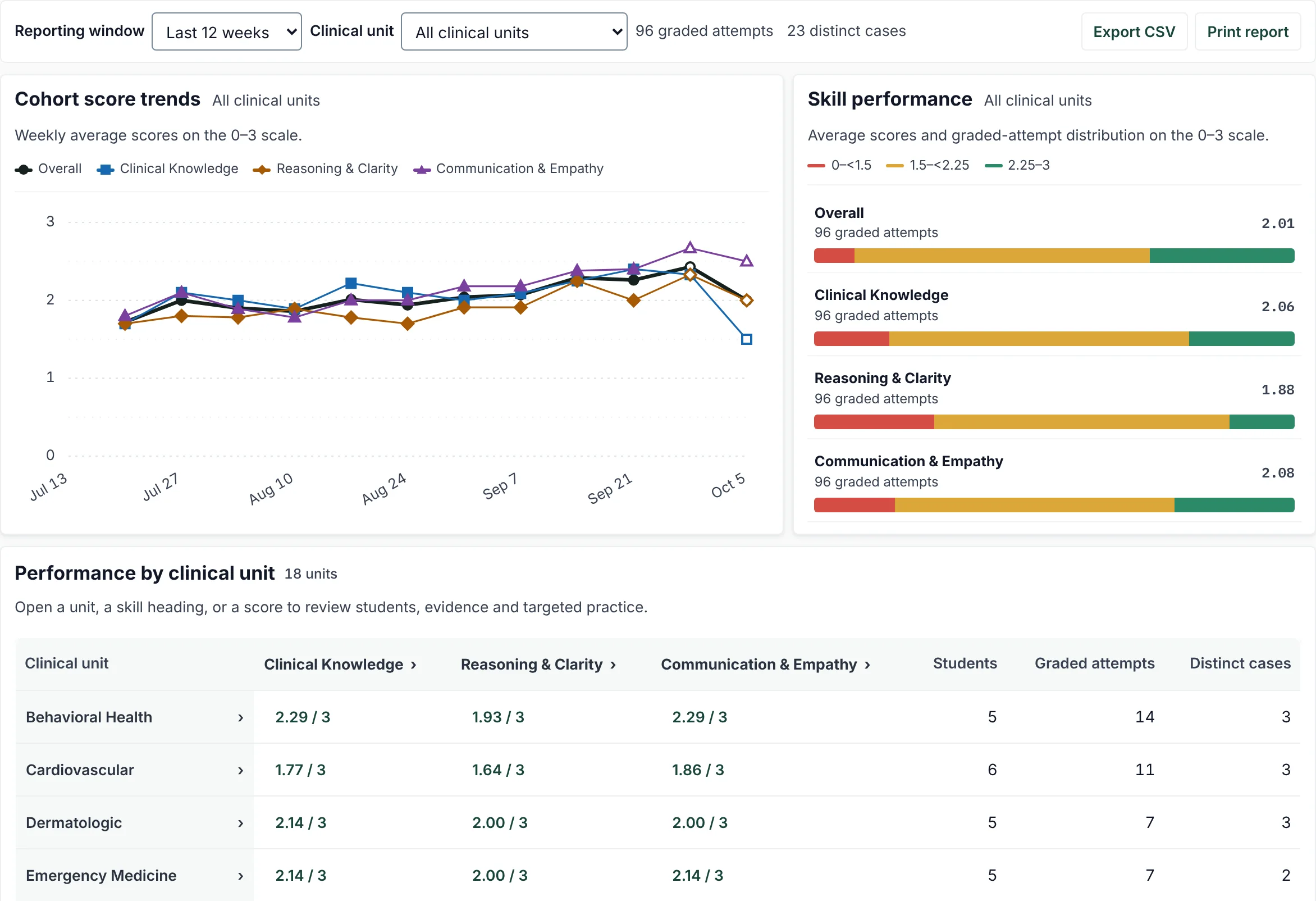
Cohort analytics for a synthetic class: weekly score trends for the three skills, average scores with their distributions, and a table of scores, students, graded attempts, and distinct cases by clinical unit.
STUDENT VIEW

Open one student

Follow one student’s scores over time and see which clinical units need attention.
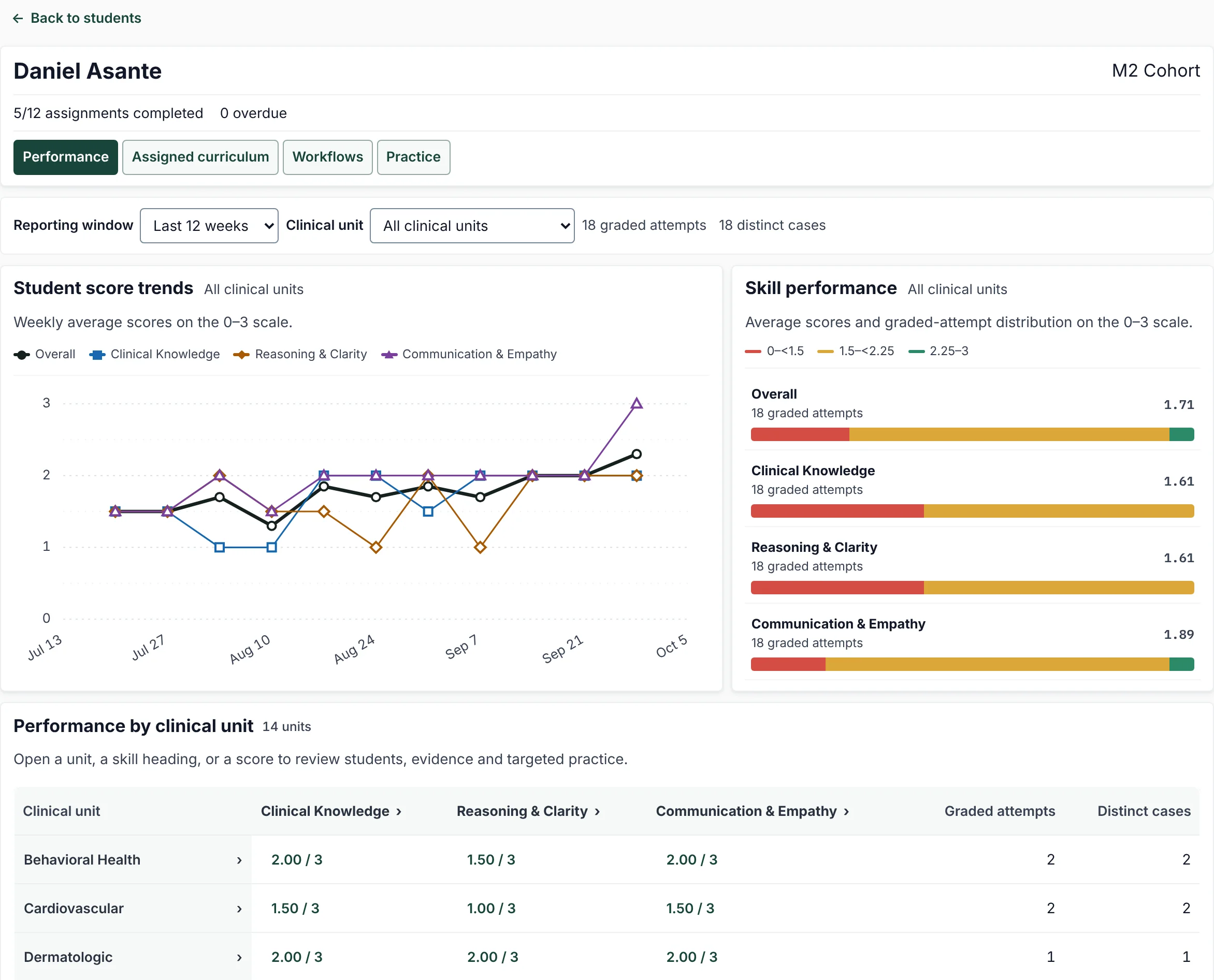
One synthetic student’s performance: weekly score trends for the three skills, average scores with their distributions, and scores by clinical unit.
05REVIEW

Review the work behind each score.

Student Workflows opens any submission: the patient conversation, orders and results, exam findings, SOAP note, and feedback.

  • Comment on the conversation, the note, or the feedback.
  • Correct an assessment you disagree with.
  • Download the full record as a PDF.
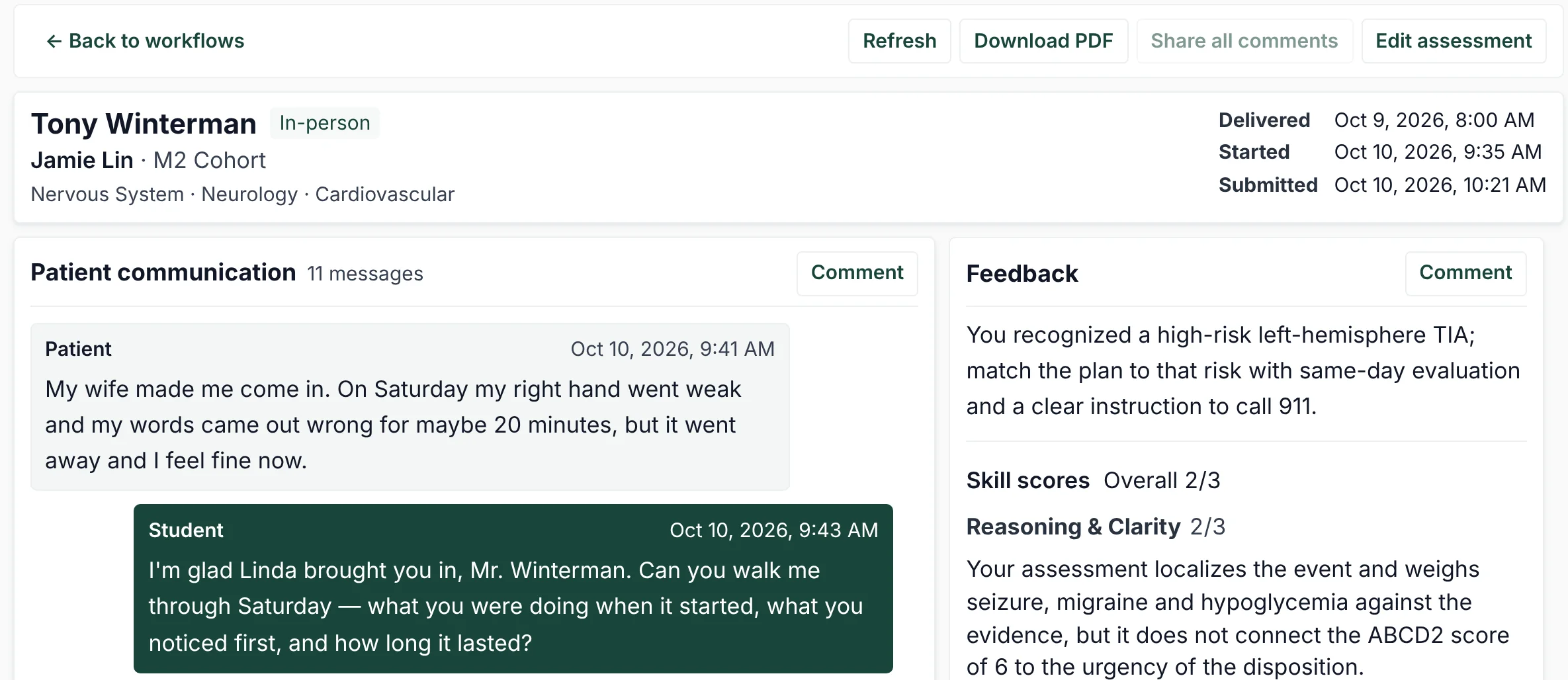
A synthetic student’s submitted encounter in Student Workflows: Download PDF and Edit assessment actions above the record, the first patient exchange with timestamps, and feedback with the overall score and a reason for Reasoning & Clarity.
The conversation and feedback side by side, with comments and corrections.
06TAILOR

Assign targeted practice.

Choose the students and the skill to strengthen. ChartCORE suggests matching scenarios and explains why each one fits.

  • Filter suggestions by rubric skill and clinical unit.
  • Open the practice now or on a date, with a submission cutoff.
  • Attach past scores to compare with the new practice.
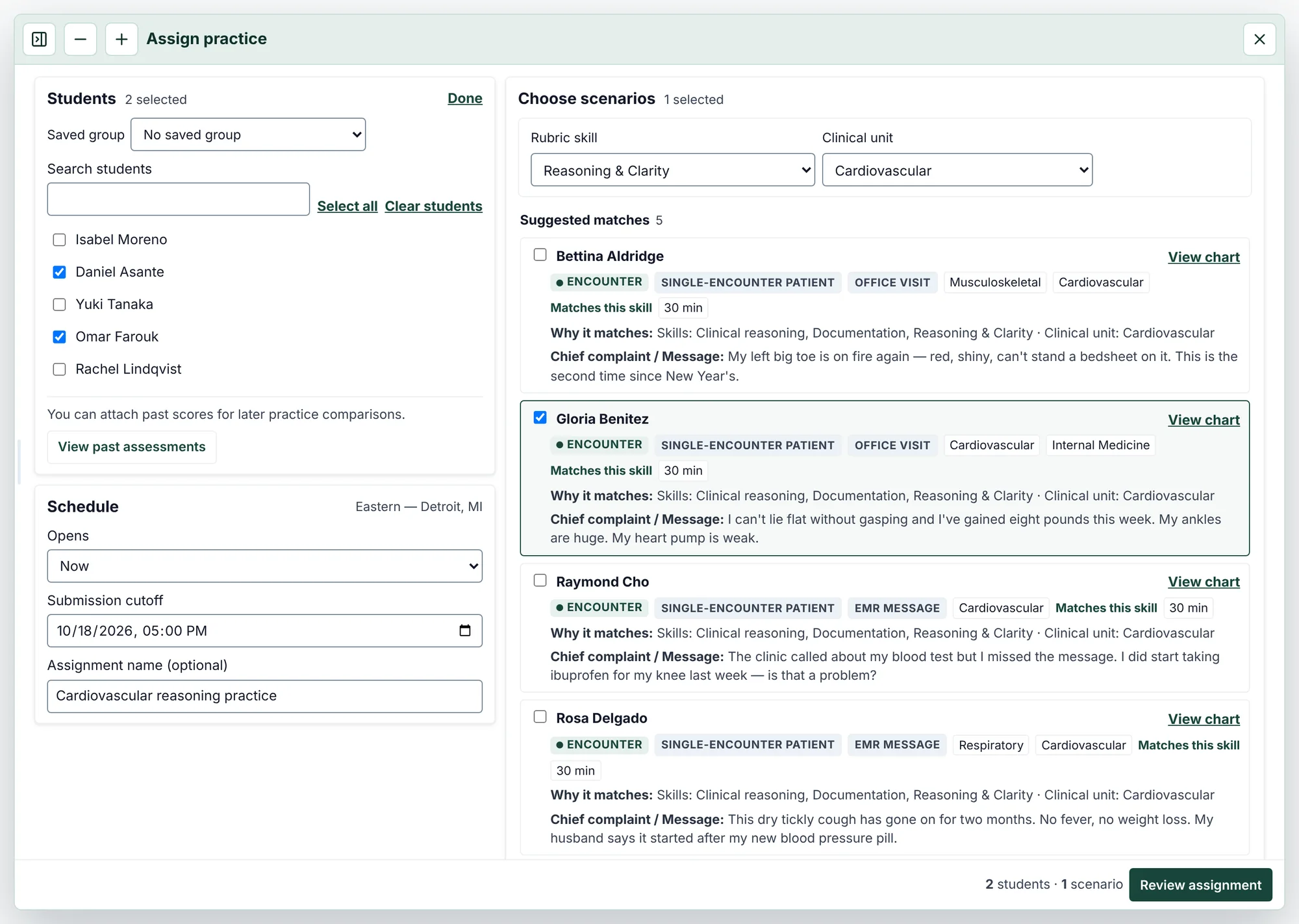
The Assign practice window: two synthetic students selected, scenarios suggested for Reasoning & Clarity in the cardiovascular unit with the reason each one matches, and the schedule with a submission cutoff.
Pick the students and the skill, then choose from suggested scenarios.
COURSE MANAGEMENT

Manage the course day to day.

Cohorts & Students

Organize cohorts and add your school’s students in bulk.

General Rubrics

Upload your school’s rubric as a PDF, review the criteria drafted from it, and choose which cohorts it grades.

Discussion Board

See class questions together and spot recurring confusion early.

Student Feedback & Support

Review student reports alongside the case or scenario they concern.

CURRICULUM REVIEW

Bring consistent evidence to curriculum review.

Ready-made clinical cases

Start with cases across the major organ systems. Assign them as they are or adapt them for your course.

Consistent assessment criteria

Every medical encounter is scored on the same three skills, and comparisons only combine work graded with compatible criteria.

Complete activity records

Keep each submission’s conversation, orders, note, and assessment, and export cohort results for curriculum review.
Bring ChartCORE to your program.

Talk with us about your curriculum, or sign in if your school already uses ChartCORE.

ChartCORE · CLINICAL SIMULATION